Overview
Call queues are beneficial to managing high call volume. They organize agents into groups (and optional tiers) to streamline the flow of incoming calls. Callers also benefit; through the use of music on hold and announcements, the caller is comforted that their call will be answered quickly and efficiently. This article explains the different types of call queues that the system offers as well as their configuration.
Types of Call Queues
Round-Robin (longest idle) routes callers to the agent who has been idle longest.
Tiered Round-Robin routes callers to tiers of agents, who are then rung one at a time before the caller moves to the next tier, until an agent answers.
Ring All routes callers to all available agents at the same time.
Linear Hunt routes callers to the available agents in a pre-defined order.
Linear Cascade routes callers to groups of available agents in a pre-defined order.
Call Park places the caller on hold until an agent retrieves the call.

Call Queue Behavior
Call queues are typically straight forward. Callers are routed based on the type of queue they've entered and how that queue has been configured. Agents then receive the call based again on the queue's configuration, but also on their own personal status, priority, and the number of concurrent calls allowed.
There are certain behaviors that result from seemingly simple actions. This section describes what to expect for specific, complex queue configurations.
For the Call Queue Announcement Configuration, please see the Auto Attendant / IVR Receptionist article.
Three options are available for your callers :
No announcement
Announce number of callers in queue
Announce average expected wait time

Requiring Agents
There is a "Require agents" option within the Pre Queue Options tab (while adding or editing a call queue). This is where you decide whether at least one agent must be online before sending the caller to the queue.

No Agents. Now What?
What happens when "Require agents" has been set to "yes" and there are no agents available? The caller will route to the "Forward if unavailable" entry as expected. If "Forward if unavailable" is not set, then the "If unanswered" destination will be used instead. The "Forward if unanswered" value from the In Queue Options tab is used to route incoming calls instead of routing to the "Forward if unavailable" value in the Pre Queue Options tab.
Callback: Stay in Queue w/ Ring timeout
For callback to work, the callback field in the queue settings must be set to "yes" and the "If unanswered" field must be set to "Stay in queue".


Situation: The queue's "unanswered" treatment has been configured to "stay in queue" AND there is a configured ring timeout as well. What will happen; will callers stay in the queue?
Technical Explanation: As with all of the advanced queue configurations, there is some ambiguity here.
First of all, the "stay in queue" treatment disables the ForwardNoAnswer for the queue owner. ForwardNoAnswer is set when the "Unanswered Treament" is NOT "Stay in Queue". So the caller will be prompted for the usual options: leave a voicemail, wait for a callback, or stay in the queue.
When the call hits the configured ring timeout, the caller is not immediately disconnected. The "if unanswered: stay in queue" treatment will then prompt the user for the same options to leave a voicemail, wait for a callback, or stay in the queue.
Callback Order
Callers need to be in a waiting state in order to be dispatched to an agent via the queue. This state does NOT include listening to the callback prompt. This may lead to unexpected sequences when dispatching.
For example, consider the following scenario and how the order of events affects callback order:
There are two callers in a queue. Caller A has been waiting in the queue for 7 minutes and Caller B has been waiting for 3 minutes.
Caller A is currently listening to a callback prompt, giving them another chance for a call back instead of continuing to wait.
Caller B is not listening to a callback prompt and is listening to the queue's waiting music.
An agent becomes available at this time. The agent connects with Caller B.
Even though Caller A has been waiting in the queue longer, Caller A is NOT in a waiting state since they are listening to the callback prompt; meaning, Caller A was not available to be dispatched to an agent at that time.
Receive a Callback - Unlimited Queue Timeout
The following examples require callback to be correctly configured. This means that the callback field in the Call Queue "In Queue Options" tab must be set to "yes". The "If unanswered" field must also be set to "Stay in queue". See the above section for details.
Situation: The "queue timeout" has been set to "unlimited". How does callback function?
Technical Explanation: When the queue timeout is unlimited, there are two ways to be prompted for the callback option:
If a queue has been configured to require agents ("Require agent"=yes), and no agent is available (refer to the "Requiring Agents" section above), then the system will first check the "Forward if unavailable" setting. If "Forward if unavailable" is not set, then the caller will hear the prompt to leave a voicemail, wait for a callback, or enter the queue. This prompt happens under this circumstance regardless if the queue timeout has been set to "unlimited" or not.
If the System Parameter <CallQueueEscapeKeys> (default is a null string) is configured with a DTMF digit code, usually "0", then the caller can use that digit to escape from the queue while they are listening to the music on hold. They will be prompted with the same choices as above: leave a voicemail, wait for a callback, or return to the queue.
Both of these scenarios can also be affected by the configured "unanswered" treatment. This treatment takes precedence even when an unlimited queue timeout has been selected.
Rules
Call Queue Rules
Users with the scope of Office Manager and above can add and configure call queues. Call Center Supervisors cannot add or delete a call queue, but they can change the type of queue assigned to a particular extension and pre queue / in queue / SMS options. Refer to the "Call Center Supervisor Scope" for more information.
A call queue must have a dedicated extension and owner. If the extension you are creating for the queue is not currently present then the system will create one and indicate this by showing the green New label to the right of the dialog box.
If the call queue does not have a music on hold file, then the system will default to using the domain music on hold.
Callers need to be in a waiting state in order to be dispatched to an agent via the queue. If the caller is listening to a callback prompt, they are NOT considered to be in a waiting state.
Agent Rules
A call queue must be configured first before assigning an agent and the agent must be "online" in order to be part of an active queue.
Call queues can contain both on-net and off-net agents.
If a device is not registered, then the agent is considered "offline".
Agents who are assigned to multiple queues can prioritize one queue over another.

Add/Edit a Call Queue
There are 4 available tabs in the Add Call Queue modal and also while actively editing an existing call queue: basic, pre queue options, in queue options, and SMS. Fill out the fields as needed and then click Save to save the new call queue.
Basic Tab
The first tab sets the name and extension of a call queue (which is required). "Name" can later be changed, but the extension cannot.
Call Park Info
Call Park is the only call queue type that does not have any tab beyond the Basic tab, and it also does not have the configurations listed here below Type.
After a Call Park queue is created, static or dynamic call parks can be configured by adding appropriate dial rules.

Pre Queue Options Tab
This screen has the same choices regardless of which call queue type is selected (except for Call Park, which does not have any additional tabs beyond Basic).

In Queue Options Tab
This tab configures what happens to callers while they are in the queue waiting to be directed to an agent.
These are the in queue options available for the following call queue types: Round-robin, Tiered Round-robin, and Linear Hunt.
Logout Agent on Missed Call
Note that "logout agent on missed call" will not work as expected if the call queue is managed by "User" vs. managed by "Device".
If, for example, a user has simultaneous ring set-up, the call queue won't know if the agent actually missed the call and therefore won't log them out.
If the queue is set to the user's device, then the queue can determine if the call was missed on the specified device, and works as expected.

These are the in queue options for only the Ring All call queue type.

These are the in queue options for only the Linear Cascade call queue type.

SMS Tab
This screen has the same choices regardless of which call queue type is selected (except for Call Park, which does not have any additional tabs beyond Basic).
Enabling SMS opens the following configuration options:

Using Call Queue
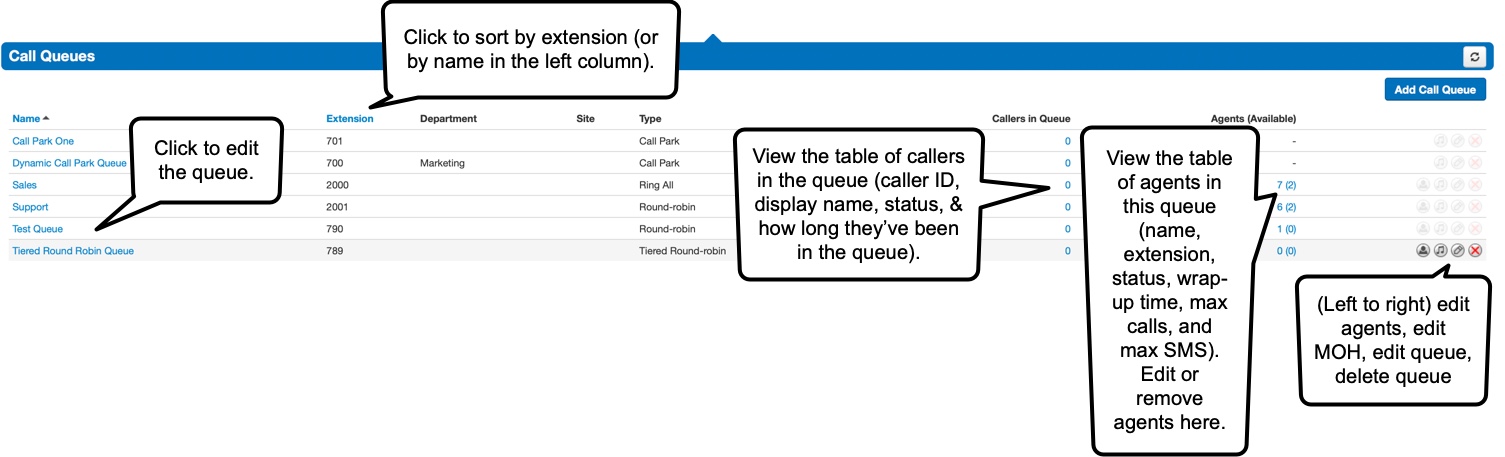
The Call Queue page lists all of the available call queues in the logged-in user's domain.
Managing Agents
Agent settings can be configured directly in the Call Queue table by clicking on the agent icon across from a call queue, or clicking on the Agents (available) column across from a call queue.
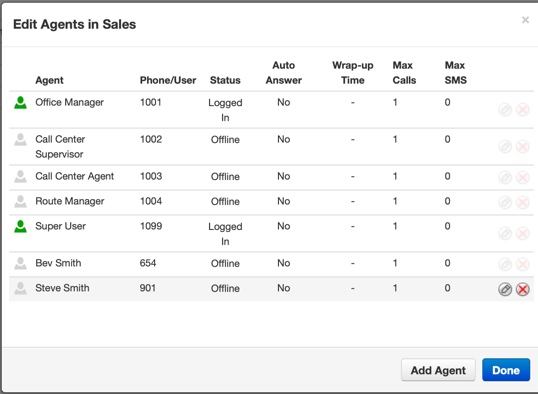
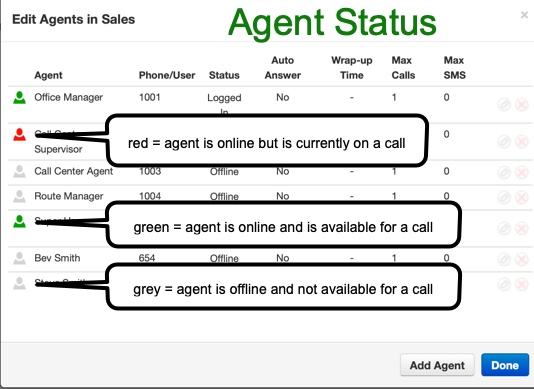
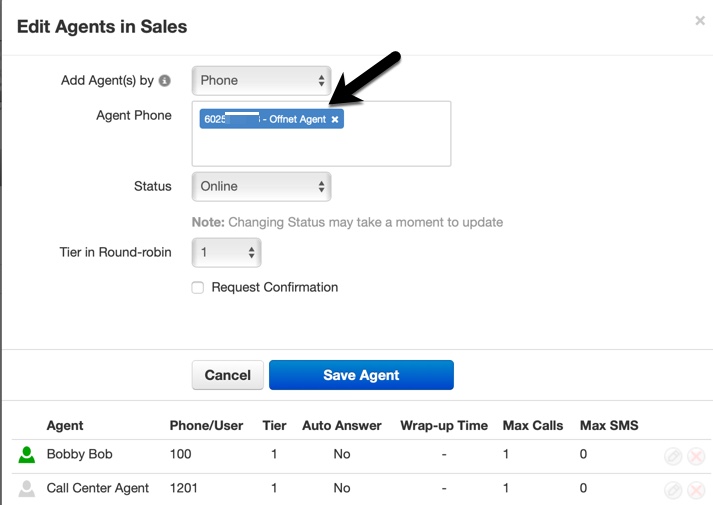
Agents can be added by "phone" or by "user". If an agent is added by "phone", then only that device will ring. If an agent is added by "user", all of the user's devices will ring.
A new agent is automatically labeled as an "offnet agent" if their phone number is not found in the system.
Call Center Supervisor
A Call Center Supervisor manages their call queues on the Call Center page.
Music on Hold
Music on Hold (MOH) is configurable for call queues. If no MOH is selected, then the domain MOH will apply.